moncycle.app v15: what's new and how to sort your sensations
moncycle.app v15 is online. Are your sensations and observations crossed out? They need sorting: read this post to understand why and how to sort them in the settings. Also: entries without a network, more complete exports and the new terms of service.
Version 15 of moncycle.app is online. You sign in as usual and your cycles are there. Only one thing needs a little of your time: the words you used to write in the “sensation” field now need to be sorted: sensation or observation. The second part explains how.
The app is in French, so the button names below are given in French.
What’s new
- A settings page organised in sections: tracking, sensations and observations, cycles by e-mail, data, security, connected devices. Every change is saved as soon as you make it.
- Use without a connection. You can fill in a day with no network: the data is sent when the connection returns, and your devices stay in sync.
- More complete exports. PDF, CSV and NFP files can be exported on demand, and the end-of-cycle e-mail now contains all three. This e-mail is optional, and can be sent to several addresses.
- Choosing your method is done with two cards: cervical mucus self-observation or FertilityCare. Temperature is an option.
- More security. No password is sent by e-mail, your address is confirmed with a link, two-factor authentication is available, and the list of your connections lets you disconnect a device.
- Less personal data. A nickname is enough (your initials, for example), and sign-up is for adults only.
Sorting your sensations and observations
What changed
Before, each day had a free text field for sensations. Now each word is a keyword that you tick in the day form. Each keyword is either a sensation or an observation:
- 🧠 Sensation: what you feel (dry, damp, slippery).
- 👀 Observation: what you see (creamy, white, transparent, stretchy).
This classification allows reliable exports and charts, and exchange with other applications.
What happened to your old words
Nothing was lost. Your old text was split at the commas, and each word became a keyword linked to the same days. The app cannot guess whether a word is a sensation or an observation, so these keywords are marked ❓ “à définir” (to be defined). They appear crossed out in the table, and under “Autre” in the day form.
They keep working. It is still better to sort them before exporting: in an export, an unsorted word is written into the day’s comment and does not become a keyword again when re-imported.
How to do it
- Open Réglages (settings), then Sensations & observations.
- Each line shows a word and, on the right, the number of days that use it. Start with the most used.
- Tap a word. A menu to sort it and three buttons appear.
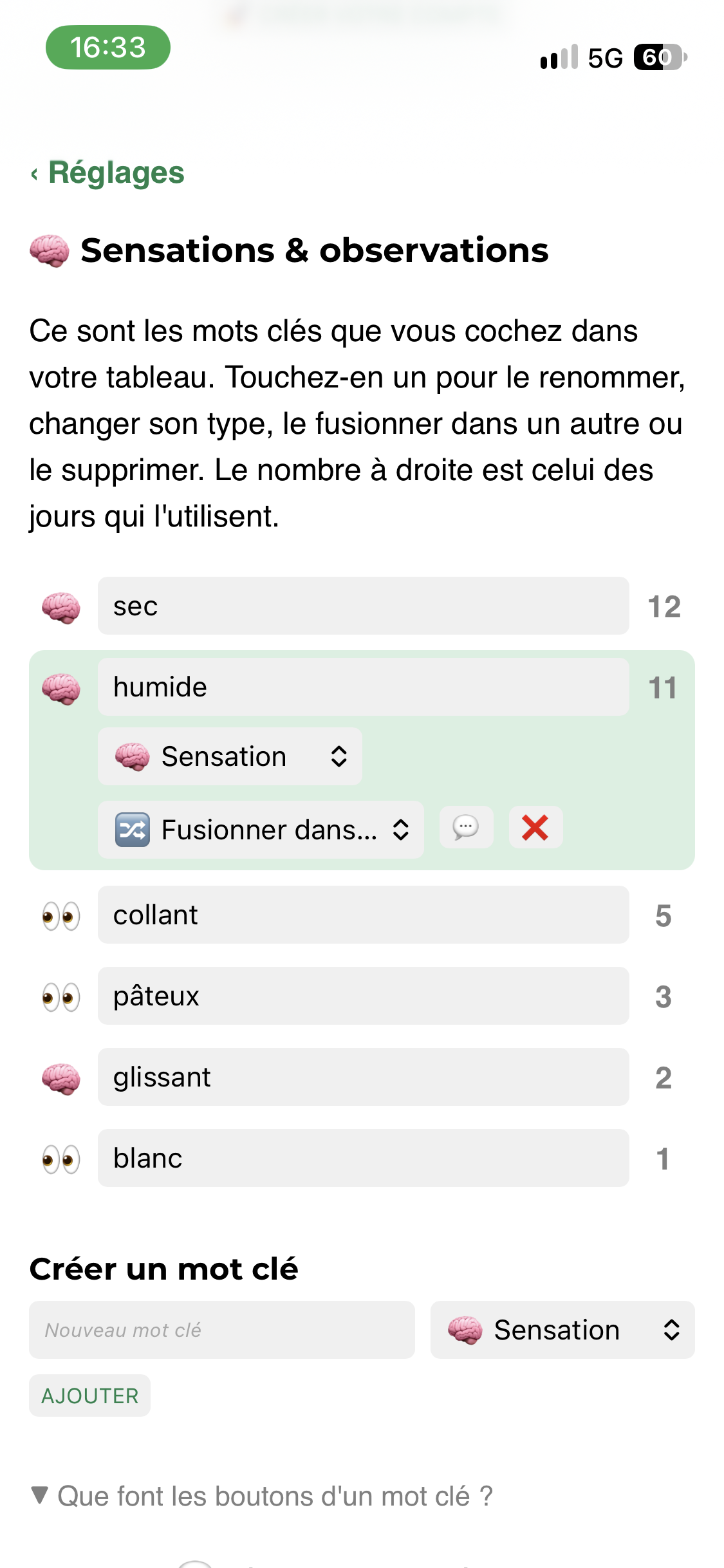
For each word, you can:
- sort it in the menu, it is saved immediately:
- 🧠 Sensation if it is what you feel (dry, damp, slippery);
- 👀 Observation if it is what you see (creamy, white, transparent, stretchy);
- rename it by editing the text of the line, which corrects all the days concerned;
- merge it (🔀) into another keyword, to group duplicates such as “Humide” and “humide”;
- move it to the comment (💬) if it is not a real keyword, for example “un peu sec le soir”;
- delete it (❌), without copying anything.
When no ❓ is left, you are done.
Good to know before you start
- You can change how a word is sorted at any time, as many times as you like.
- Merging, moving to the comment and deleting are final. The app asks for confirmation and details what it is about to do.
- If you want a safety copy, first export your history in NFP format (Réglages, then Mes données).
- During a merge or a move, keep the page open. If the connection drops, nothing is deleted: just run the action again.
- You do not have to do everything at once.
The new terms of service
Version 15 comes with new terms of service and a new privacy policy. You can find them at sign-up and in Réglages, then À propos et contact. In short:
- moncycle.app is a wellbeing tool: it is neither a medical device nor a contraceptive;
- the app is for adults trained in their method;
- do not enter any information that identifies you, or any medical information;
- data is hosted in France and is never sold;
- you can export, change or delete everything;
- an account inactive for 4 years is deleted, after a warning by e-mail.
Existing accounts will receive an e-mail with the date the new terms apply. See also the legal information.
For technical readers
The version 15 code is published on GitHub, with technical release notes. The new Docker images are available on Docker Hub.